Gantt chart for Jira, free: a 2-minute install guide
If you are on Jira Cloud and need a Gantt chart without paying $1.50/user/month from day one, here is how to add one for free in about two minutes. This guide is written for anyone who has opened Jira, looked for a native Gantt view, found only the narrow Basic Roadmap in a Scrum project, and gone looking for a real timeline. We will cover why Jira does not ship a proper Gantt by default, how to install a free Gantt chart plugin for Jira, how to get your issues onto that chart, how to draw dependencies between tasks, and how the free tier compares honestly against the paid giants of the Atlassian Marketplace. If you are just looking for the plugin, skip to the 2-minute install.
Why Jira does not include Gantt charts by default
Jira is built around the agile board — Scrum sprints, Kanban columns, a backlog. A Gantt chart is a different mental model: a horizontal timeline of tasks with dates, durations, and dependencies between them. Jira has always been cautious about wiring agile concepts to dates, because one of the core agile ideas is that commitments happen at the sprint level, not at the Gantt level. That is why the built-in Basic Roadmap in a Scrum project only shows epics against a loose time axis, with no dependency arrows, no critical path, no baseline, and no spreadsheet table next to it.
Atlassian does offer Advanced Roadmaps, but that is only available on the Jira Premium and Enterprise tiers, which start at roughly $14.54/user/month — dramatically more than a dedicated Gantt plugin. Advanced Roadmaps is also opinionated about cross-project portfolio planning rather than single-project timeline work, so even teams on Premium often end up installing a Marketplace Gantt anyway. The Atlassian Marketplace is where the ecosystem has collectively agreed to put Gantt functionality, and it is the right place to look.
The tradeoff, historically, has been cost. The big three paid Gantt plugins — BigGantt (Appfire), WBS Gantt (Ricksoft), and Structure.Gantt (Tempo) — charge between $1.27 and $1.82 per user per month once you pass 10 users. GanttTable went paid in April 2026 at $1.50. Many small teams looked at those numbers and simply lived without a proper Gantt. The good news is that is no longer necessary.
The 2-minute install
This section walks through installing GanttBoard for Jira, a native Forge app that is free through August 1, 2026 and free forever for teams of 10 or fewer. It is the easiest free Gantt for Jira Cloud to set up. You need Jira admin permissions on the target site; if you do not have them, ask whoever does — the install takes less than a minute.
-
Open the Atlassian Marketplace listing. Go to the GanttBoard page. You will see the standard Marketplace card with screenshots and the Runs on Atlassian badge — that badge means the app is built on Forge, which is Atlassian's vetted app platform, so nothing leaves your cloud tenant.
- Click "Get it now". If you admin multiple Jira Cloud sites, a dropdown appears. Pick the one you want the Gantt chart added to. Atlassian installs the app in the background — no zip files, no server restart, no configuration.
-
Open any Scrum or Kanban project. A new tab called GanttBoard appears in the project sidebar. Click it. That is the install done. Everything after this is just about getting your issues onto the chart.
Total clicks from Marketplace to working Gantt: five. No server setup, no database to provision, no license key to paste in. This is the entire pitch of Forge as an app platform, and it is why free tools can actually be free — GanttBoard does not have hosting costs to recoup.
Your first Gantt chart
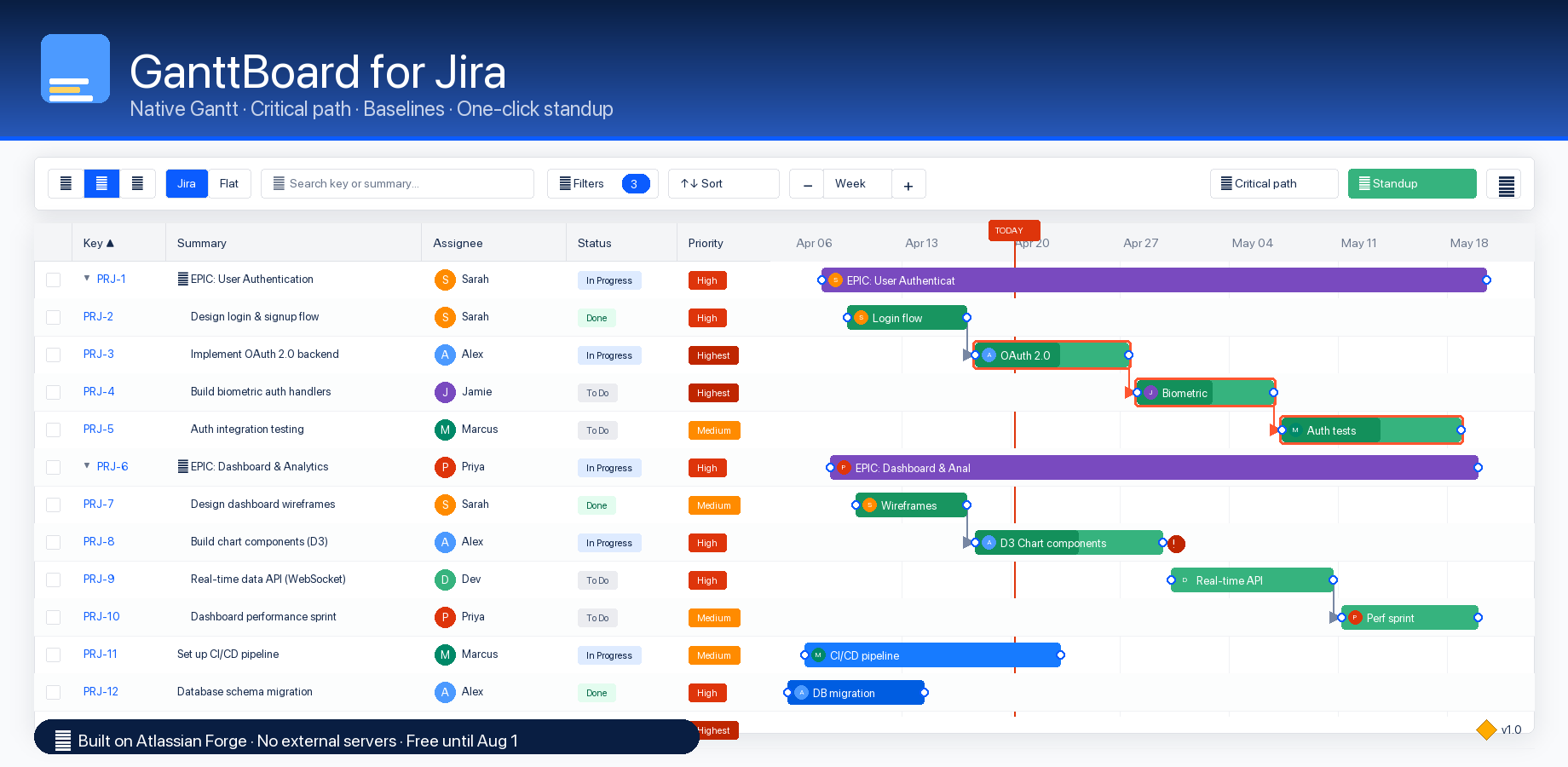
A Gantt chart draws task bars from a start date to an end date. GanttBoard reads the Start date and Due date fields straight off your Jira issues — whichever issues already have both dates show up on the timeline the instant you open the tab. This is the big advantage of a native Forge approach: there is no separate "GanttBoard database" of tasks. Your Jira issues are the source of truth, and moving a bar in GanttBoard writes the new due date directly back to Jira.
If an issue is missing a start or due date, it still appears in the spreadsheet table on the left side of the split view. You can double-click the date cells to fill them in, and the bar appears on the right the moment both dates exist. If Start date is not exposed on your project's issue view, you may need to add it via Project settings → Issue layout in Jira — this is a one-time configuration and it applies to your entire project.
Once your issues are on the chart, the interaction model is the one you would expect from a desktop Gantt tool:
- Drag a bar horizontally to change the due date. The start and end shift together, keeping duration constant.
- Drag the right edge of a bar to change duration, keeping the start date fixed.
- Double-click a status cell to transition the issue through its workflow — GanttBoard reads your Jira workflow and offers the legal next statuses.
- Double-click an assignee cell to reassign. GanttBoard pulls users from the same place Jira does.
- Click any blue issue key to open the issue in Jira in a new tab.
Zoom runs from Day to Quarter through four discrete levels. A red TODAY line runs down the whole chart. Overdue items get a red exclamation badge and a dashed border so you can see slipped work at a glance. Zero-duration issues render as diamond milestones. This is the part of a Gantt you use every day, and the learning curve is essentially zero if you have ever used another timeline tool. For the full feature list see the features page.
Adding dependencies
A Gantt chart without dependencies is really just a date picker with a background image. The real value — critical path, auto-scheduling, seeing what slips when something is late — only emerges once you link tasks together. GanttBoard supports the four classical project-management dependency types: Finish-to-Start (the most common), Start-to-Start, Finish-to-Finish, and Start-to-Finish. The UI is designed to make the common case fast.
Hover over any bar and two small dots become visible — one at the start edge, one at the end edge. Click and hold a dot, then drag to a dot on another bar. GanttBoard watches which two dots you connected and infers the dependency type: end-to-start is FS, start-to-start is SS, end-to-end is FF, and start-to-end is SF. A dialog opens with the correct type pre-selected, so you can either confirm or tweak. If you want to add a lag (for example, "the second task must start three business days after the first one finishes"), there is a number field for it right there.
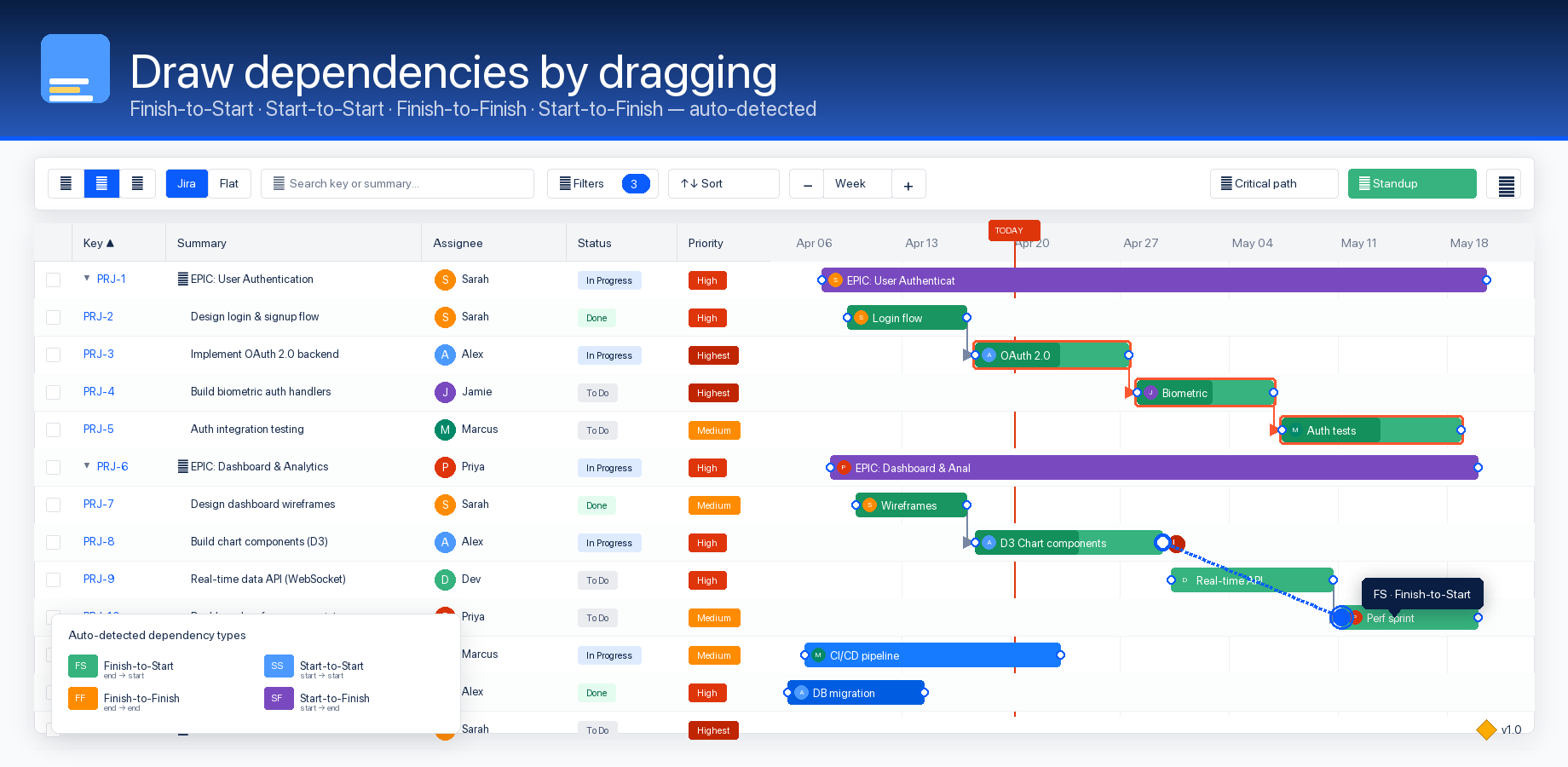
Once two tasks are linked, an L-shaped arrow connects them. Once you have a few arrows, turn on critical path from the toolbar and the longest chain through your project is highlighted automatically — that is the set of tasks where any slip pushes your deadline. This is the classic CPM (Critical Path Method) algorithm applied to your Jira issues, and it works identically to what MS Project or Primavera would produce.
What you get for free vs. what competitors charge for
Here is the honest price comparison across the main Jira Gantt chart plugins, pulled from the Atlassian Marketplace in April 2026. The "11–100 users" column is the tier most paying teams land on, and it is where the pricing differences bite.
| Plugin | 1–10 | 11–100 | 101–250 | Runs on Atlassian | Critical path | Baselines |
|---|---|---|---|---|---|---|
| GanttBoard | Free | $1.20 | $0.80 | Yes | Yes | Yes |
| GanttTable | Free | $1.50 | $1.00 | Yes | Yes | No |
| WBS Gantt | Free | $1.32 | $0.90 | No | Yes | Yes |
| BigGantt | Free | $1.82 | $1.10 | No | Yes | Yes |
| Structure.Gantt | $1.00/u | $1.27 | $0.91 | No | Yes | Yes |
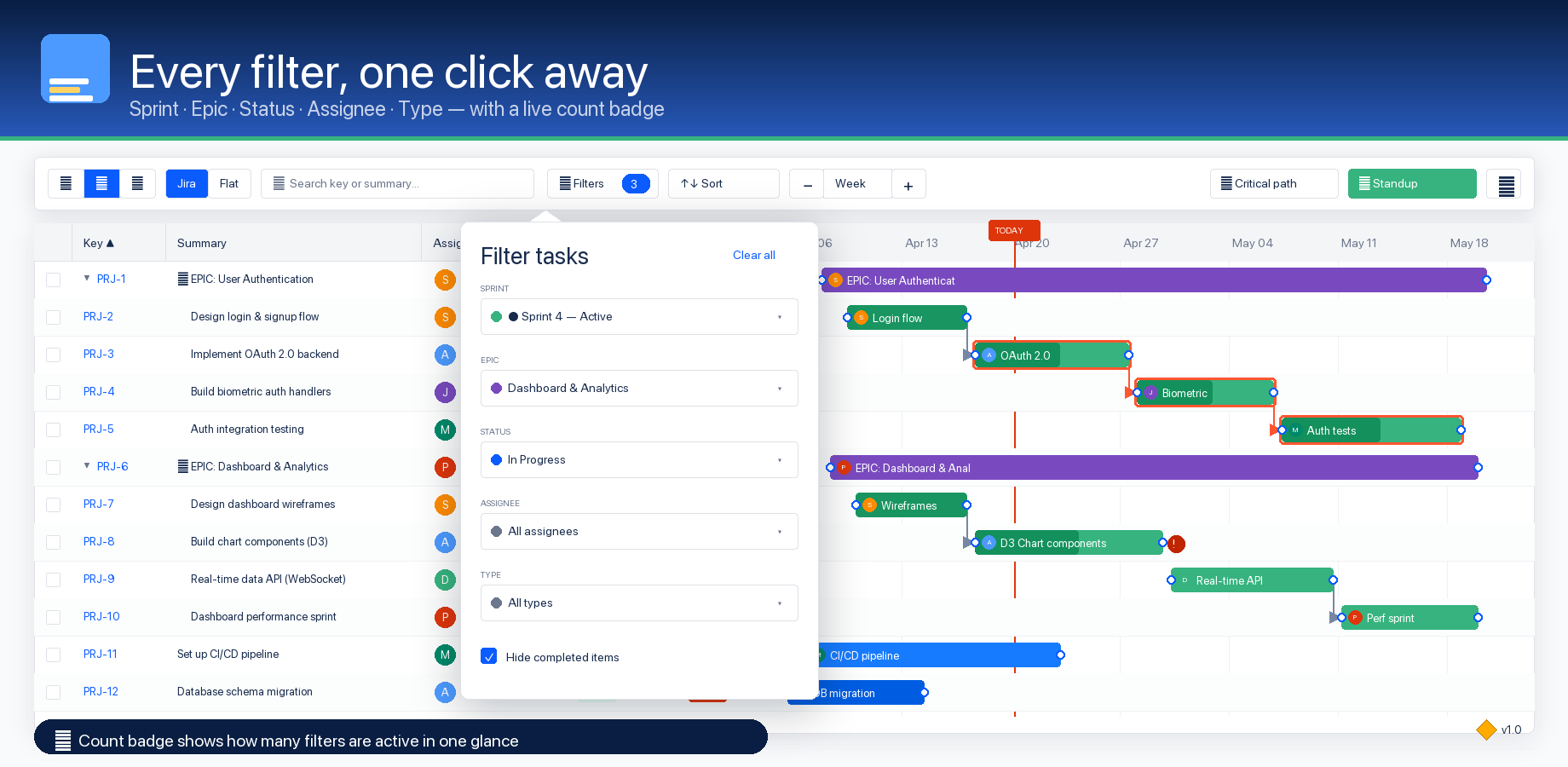
Three things are worth calling out. First, GanttBoard is the cheapest in every tier where it has competition, and until August 1, 2026 it is free for any team size — that is the launch window. Second, GanttBoard and GanttTable are the only two with the Runs on Atlassian Forge badge, which is a meaningful data-residency and security signal for organizations that care about where their Jira data lives. Third, the feature gap is small: every plugin listed supports critical path; most support baselines; all support the four dependency types. What you are buying at the higher price points is brand history, not capability.
GanttBoard's pricing page lays out the tier structure in full, including enterprise levels down to $0.04/user/month at 10,000+ users. The short version: if you are a team of 10 or fewer, you will never be charged. If you are a team of 11–100, you will pay $1.20/user/month starting in August 2026 — a single user for less than the cost of a coffee.
When you would outgrow this
Honest section. GanttBoard is not the right tool for every team. If you need full resource-leveling with drag-and-drop capacity bars, Structure.Gantt and BigPicture have more mature workflows for that (and correspondingly larger price tags). If you are running cross-project portfolio planning at enterprise scale with dozens of programs and custom governance, BigPicture is still the category leader. If you specifically need Jira Data Center rather than Cloud, GanttBoard does not ship a Data Center build yet — WBS Gantt or Structure.Gantt are the established options. And if you want ten years of case studies and enterprise references, GanttBoard launched in April 2026 and simply does not have them yet.
For everything else — single-project Gantt, multi-project with filters and saved views, critical path, baselines, standup facilitation, and an honest price — GanttBoard covers the 80% of Gantt planning that teams actually use day to day. If you outgrow it, the data is still in Jira, so switching costs stay low.
Conclusion
The gap between "I wish Jira had a Gantt chart" and "I have a Gantt chart in Jira" used to involve a procurement conversation and a $1.50-per-user-per-month invoice. It does not anymore. Two minutes on the Atlassian Marketplace gives you a native Forge Gantt with critical path, baselines, dependencies, and auto-scheduling — free for every team size until August 2026, and free forever for teams of ten or fewer. Install it and see whether it fits your planning. If it does not, uninstall with one click. Your Jira data never moved.